> ## Documentation Index
> Fetch the complete documentation index at: https://help.tiretutor.ai/llms.txt
> Use this file to discover all available pages before exploring further.
# Tire quote notifications
> Know the moment Noah texts a caller a tire quote, and find every quote nobody at the shop has looked at yet.
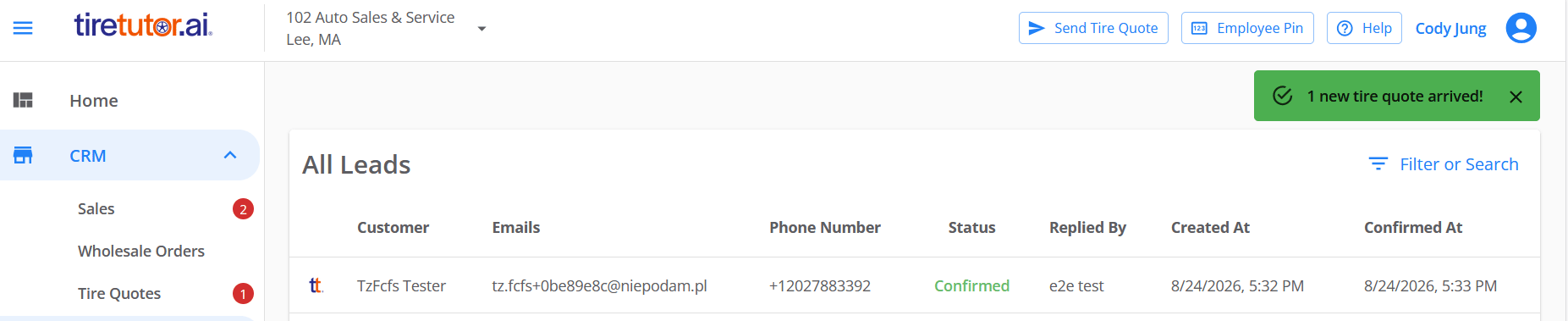
When Noah, your Phone Agent, texts a caller a tire quote, that quote lands
under **Tire Quotes** in the CRM section of the left-hand menu — even though
nobody at the shop touched it.
That entry carries a red counter: the number of quotes that arrived on their
own and nobody has opened yet. Quotes you or your staff send never count
toward it.
## What you see
When one of Noah's quotes arrives, a chime plays and a green notification
appears at the top right, reading **1 new tire quote arrived!**. It closes
itself after 10 seconds, or you can close it yourself.
* Click the notification to open that quote.
* When several arrive together, the notification counts them and clicking it
opens the **Tire Quotes** list.
The notification appears in an open TireTutor tab in a web browser, and only
while you have the **CRM** section of the left-hand menu open — fold that
section away and it cannot appear, though the chime still plays. If you have
more than one shop, it appears in tabs viewing the shop that took the call.
 ## You keep the count even if you miss the notification
The notification disappears after 10 seconds, but the counter does not. A
closed laptop or a signed-out session means no chime and no notification, and
the red counter still shows the quotes waiting for you the next time you sign
in.
## How the count clears
* Open the **Tire Quotes** page and the counter clears. Every quote in the
list counts as seen, including ones you did not open.
* Open a single quote from a notification and only that quote clears. The
others stay counted until you look at them.
* Each shop keeps its own count. Switching shops shows that shop's number.
## When you're working in another tab
If you clicked **Allow** when your browser asked to show notifications, a
browser alert appears as well. Click it to open the quote — or the
**Tire Quotes** list, when several arrived together.
If you dismissed that permission request, turn notifications back on for
TireTutor in your browser's site settings.
## Get the most out of it
* Keep TireTutor open in a browser near the counter.
* Keep the **CRM** section of the menu expanded. The notification cannot show
while you have that section folded away.
* Click anywhere in TireTutor after opening it. Browsers keep sound off until
you interact with the page at least once, and every new quote plays a chime.
## You keep the count even if you miss the notification
The notification disappears after 10 seconds, but the counter does not. A
closed laptop or a signed-out session means no chime and no notification, and
the red counter still shows the quotes waiting for you the next time you sign
in.
## How the count clears
* Open the **Tire Quotes** page and the counter clears. Every quote in the
list counts as seen, including ones you did not open.
* Open a single quote from a notification and only that quote clears. The
others stay counted until you look at them.
* Each shop keeps its own count. Switching shops shows that shop's number.
## When you're working in another tab
If you clicked **Allow** when your browser asked to show notifications, a
browser alert appears as well. Click it to open the quote — or the
**Tire Quotes** list, when several arrived together.
If you dismissed that permission request, turn notifications back on for
TireTutor in your browser's site settings.
## Get the most out of it
* Keep TireTutor open in a browser near the counter.
* Keep the **CRM** section of the menu expanded. The notification cannot show
while you have that section folded away.
* Click anywhere in TireTutor after opening it. Browsers keep sound off until
you interact with the page at least once, and every new quote plays a chime.