> ## Documentation Index
> Fetch the complete documentation index at: https://help.tiretutor.ai/llms.txt
> Use this file to discover all available pages before exploring further.
# Customer report
> The page a customer opens from the report link, and what an approval authorizes.
A customer opens the report page from a link you send by email or text message. Choose the delivery methods for each contact in the **Recipient** list. Read this page before you send, so you can set the right expectation.
## The email or text message
The email shows no prices and no counts. It says the report is ready and links to it. The text message carries your shop name, the vehicle, and the link. A customer sees a price only after they open the report.
For every element of the email, see the [report email format](/dealers/dvi/reference#report-email-format).
## The report page
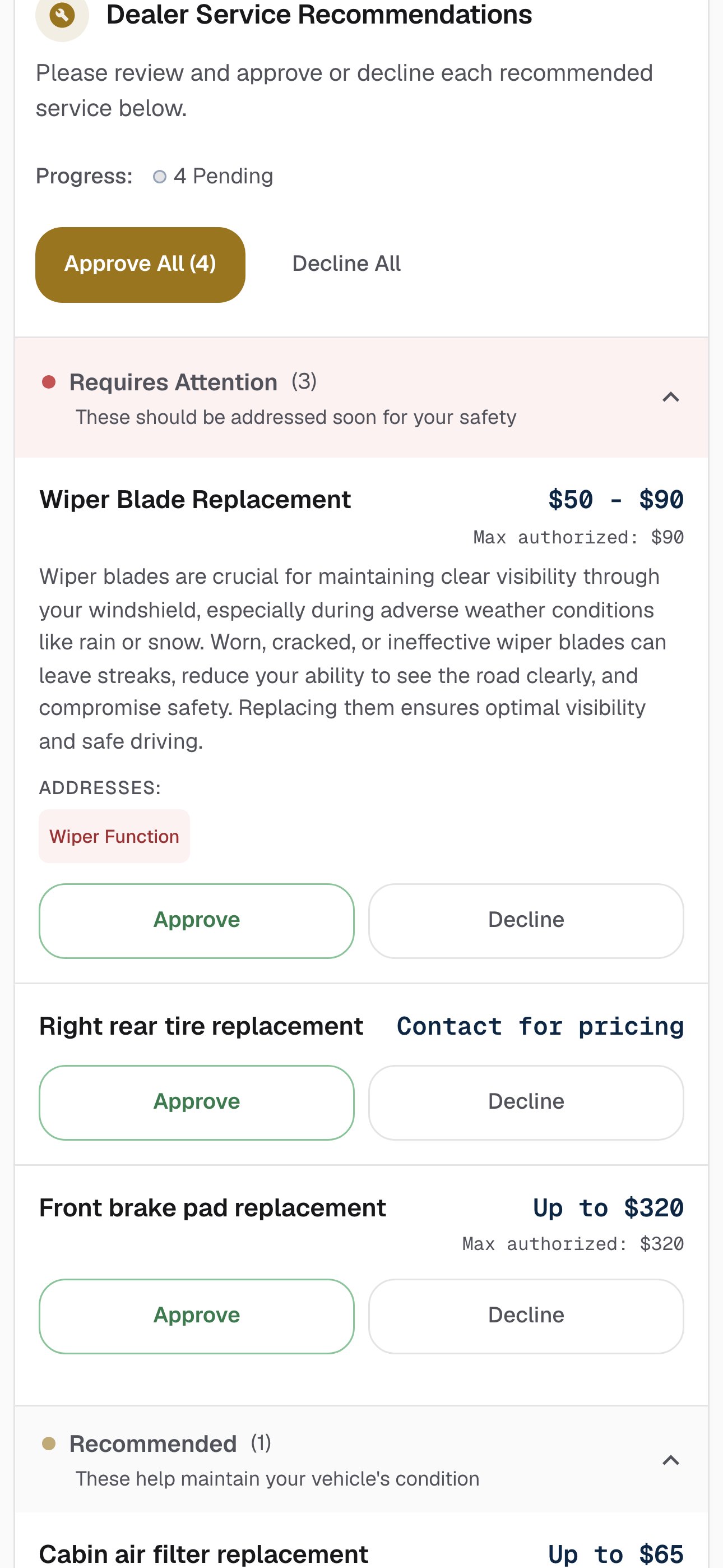
The services sit under **Dealer Service Recommendations**. The section asks the customer to review and approve or decline each recommended service.
Two groups split the list.
| Group | The report explains | Holds |
| - | - | - |
| **Requires Attention** | These should be addressed soon for your safety | The services you set to **REQ** |
| **Recommended** | These help maintain your vehicle's condition | The services you set to **SUG** |
You rate an inspection item **OK**, **Suggested**, or **Required**. A service carries its own priority toggle — **REQ** or **SUG**. A service you write by hand has a priority you set, but no item rating behind it unless you link one.
 ## What the price reads
Each service carries its own price line. What the customer reads follows what you entered in the dialog.
| You entered | The customer reads |
| - | - |
| **Exact** with one figure | **\$X** |
| **Est.** with a low and a high | **$X - $Y** |
| **Est.** with only a high | **Up to \$X** |
| **Est.** with only a low | **From \$X** |
| nothing in the price field | **Contact for pricing** |
The report rounds each price to whole dollars. A service priced above **$0** also carries a **Max authorized: $X** line under its price, taken from its high figure. That line reads **\$0** on a service the customer declines.
A price of **0** is not an empty price. The customer reads **\$0**, which reads as free work. Leave the field empty instead.
## Approving and declining
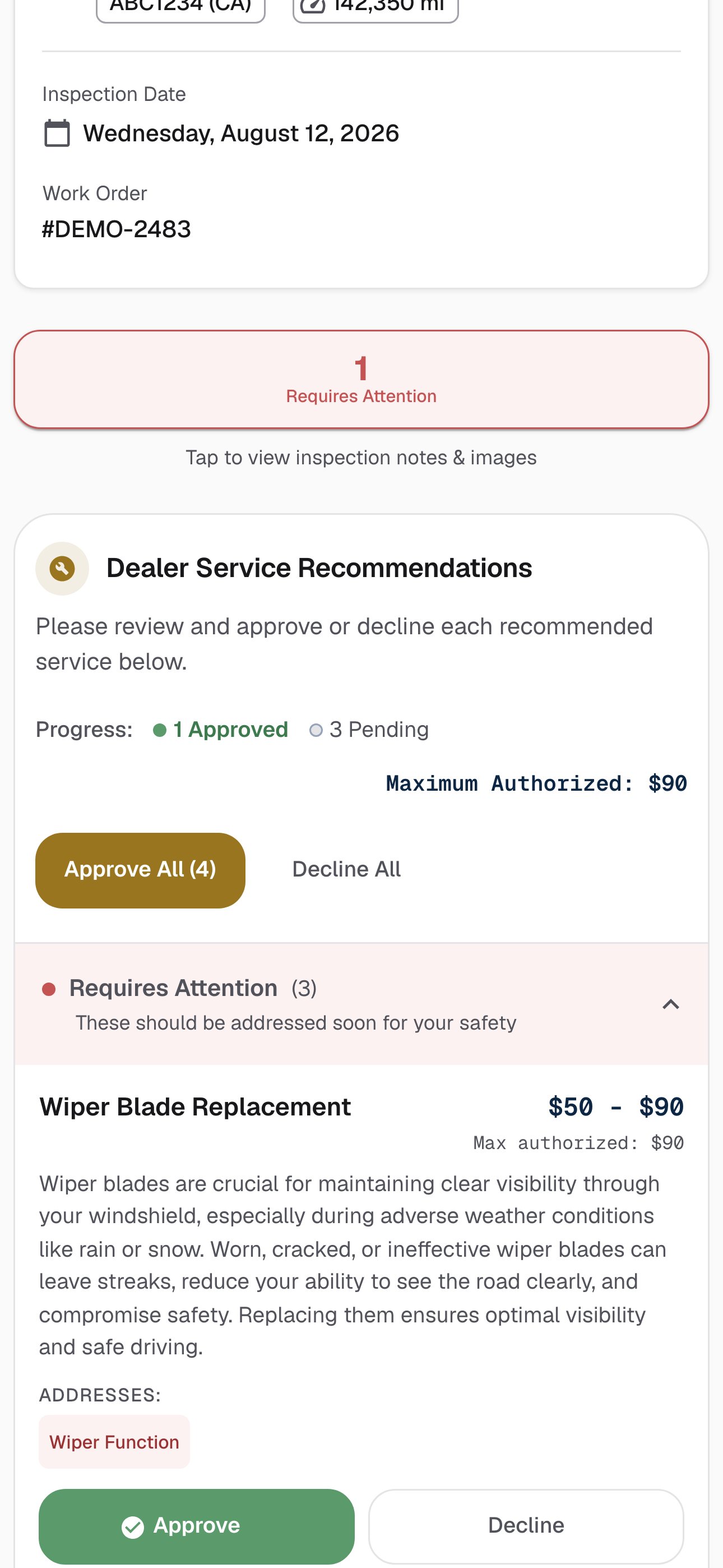
The customer answers each service with **Approve** or **Decline**. Two buttons answer the whole list at once: **Approve All**, which carries the count in its label, and **Decline All**. The count is the number of services on the report, not the number still waiting for an answer.
A total line tracks the answers. It reads **Maximum Authorized**, followed by the sum of the approved prices.
One **Approve** does not finish the flow. After the customer answers every service, a consent step shows the maximum authorized amount, and a confirmation screen follows.
Approving a service that carries a price authorizes up to its high figure. That figure is a ceiling, not a bill — work above it needs a new approval. Approving a service that carries no price commits no amount: it tells the shop to call. A customer who approves only unpriced services sees **Maximum Authorized: \$0**.
## What the price reads
Each service carries its own price line. What the customer reads follows what you entered in the dialog.
| You entered | The customer reads |
| - | - |
| **Exact** with one figure | **\$X** |
| **Est.** with a low and a high | **$X - $Y** |
| **Est.** with only a high | **Up to \$X** |
| **Est.** with only a low | **From \$X** |
| nothing in the price field | **Contact for pricing** |
The report rounds each price to whole dollars. A service priced above **$0** also carries a **Max authorized: $X** line under its price, taken from its high figure. That line reads **\$0** on a service the customer declines.
A price of **0** is not an empty price. The customer reads **\$0**, which reads as free work. Leave the field empty instead.
## Approving and declining
The customer answers each service with **Approve** or **Decline**. Two buttons answer the whole list at once: **Approve All**, which carries the count in its label, and **Decline All**. The count is the number of services on the report, not the number still waiting for an answer.
A total line tracks the answers. It reads **Maximum Authorized**, followed by the sum of the approved prices.
One **Approve** does not finish the flow. After the customer answers every service, a consent step shows the maximum authorized amount, and a confirmation screen follows.
Approving a service that carries a price authorizes up to its high figure. That figure is a ceiling, not a bill — work above it needs a new approval. Approving a service that carries no price commits no amount: it tells the shop to call. A customer who approves only unpriced services sees **Maximum Authorized: \$0**.
 ## Where to go next
Write a service by hand, or leave its price empty.
Rate items, draft the summary, and set your own prices.
What the AI reads, and why its prices are national averages.
Choose who at the shop hears about an approval.
## Where to go next
Write a service by hand, or leave its price empty.
Rate items, draft the summary, and set your own prices.
What the AI reads, and why its prices are national averages.
Choose who at the shop hears about an approval.