> ## Documentation Index
> Fetch the complete documentation index at: https://help.tiretutor.ai/llms.txt
> Use this file to discover all available pages before exploring further.
# Managing national accounts
> Bill a work order to your customer's national account provider instead of collecting the balance at the counter.
Bill fleet work to the customer's national account provider, and keep the purchase order number with the repair record.
**Bill to National Account** appears only after you select a **National Account Provider** on the customer record. Until you do, the work order behaves like any other, and TireTutor keeps every line you enter.
## Set the customer's provider
**When:** A fleet customer's work goes on their national account rather than on a card at your counter.
Open the work order. Select **Edit** under **Customer Details**.
Select the customer's provider under **National Account Provider**. The list shows the providers TireTutor supports. Select **None** for a customer who pays you directly.
Select **Save**.
**Customer Details** shows a **National Account** chip with the provider's name.
## Bill the work order
**When:** The work is finished and the provider pays instead of the customer.
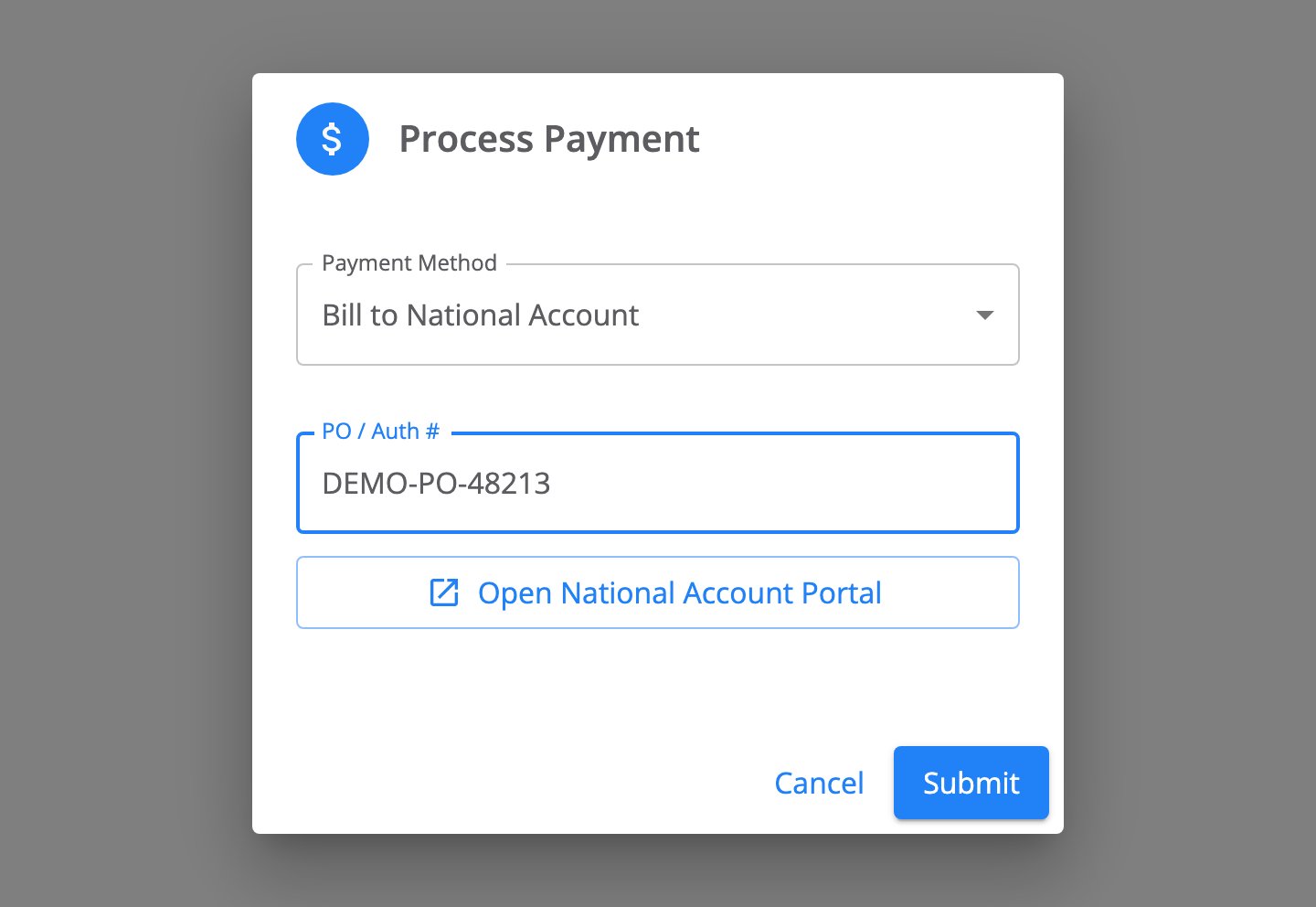
Open the work order. Select **Process Payment**.
Select **Bill to National Account** under **Payment Method**. TireTutor selects it for you when the customer has a provider.
Enter the number the provider gave you in **PO / Auth #**. The work order needs this number before you submit.
Select **Submit**.
 The work order shows **Work order already billed to** the provider, with the purchase order number.
## What a national account work order shows
A national account work order reads differently from a counter sale.
* Each line item shows **N/A** in place of a price, and the order total shows **Not Applicable**.
* The printed and emailed copies show the same, and carry a **Billed to** line with the provider and the purchase order number.
* The customer card carries a **National Account** chip.
* The dispatch board card carries a **National Account** tag.
* **Open National Account Portal** takes you to the provider's own site.
Prices read as not applicable because the provider settles the bill in their own system, not at your counter.
## What national accounts does not do
* **A customer holds one provider.** A customer who bills to two providers needs a second customer record.
* **A work order holds one purchase order number.** Billing the same work order again replaces the number instead of adding a second one. The work order has to be open, so [reopen it](/dealers/pos/reopening-work-orders) first if you finished it.
* **TireTutor does not send the bill to the provider.** Raise the charge in the provider's portal yourself.
## Troubleshooting
* **No Bill to National Account under Payment Method.** Check that **Customer Details** shows the **National Account** chip. Set the provider on the customer record, then reopen **Process Payment**.
* **Submit does nothing.** TireTutor shows **PO / Auth # is required for National Account**. Enter the number the provider gave you.
* **The wrong provider is on the job.** Set the correct provider on the customer record before you take payment.
## Still need help?
Contact support through the [contact form](https://tiretutor.com/contact), or call [855-400-4521](tel:+18554004521).
Mention the work order number and the provider's name.
## Where to go next
Collect card, cash, check, and partial payments at the counter.
Learn how the Point of Sale pages fit together.
The work order shows **Work order already billed to** the provider, with the purchase order number.
## What a national account work order shows
A national account work order reads differently from a counter sale.
* Each line item shows **N/A** in place of a price, and the order total shows **Not Applicable**.
* The printed and emailed copies show the same, and carry a **Billed to** line with the provider and the purchase order number.
* The customer card carries a **National Account** chip.
* The dispatch board card carries a **National Account** tag.
* **Open National Account Portal** takes you to the provider's own site.
Prices read as not applicable because the provider settles the bill in their own system, not at your counter.
## What national accounts does not do
* **A customer holds one provider.** A customer who bills to two providers needs a second customer record.
* **A work order holds one purchase order number.** Billing the same work order again replaces the number instead of adding a second one. The work order has to be open, so [reopen it](/dealers/pos/reopening-work-orders) first if you finished it.
* **TireTutor does not send the bill to the provider.** Raise the charge in the provider's portal yourself.
## Troubleshooting
* **No Bill to National Account under Payment Method.** Check that **Customer Details** shows the **National Account** chip. Set the provider on the customer record, then reopen **Process Payment**.
* **Submit does nothing.** TireTutor shows **PO / Auth # is required for National Account**. Enter the number the provider gave you.
* **The wrong provider is on the job.** Set the correct provider on the customer record before you take payment.
## Still need help?
Contact support through the [contact form](https://tiretutor.com/contact), or call [855-400-4521](tel:+18554004521).
Mention the work order number and the provider's name.
## Where to go next
Collect card, cash, check, and partial payments at the counter.
Learn how the Point of Sale pages fit together.