> ## Documentation Index
> Fetch the complete documentation index at: https://help.tiretutor.ai/llms.txt
> Use this file to discover all available pages before exploring further.
# Dealer and Store settings
> Update the details customers see for your dealership and for each shop, and have the change take effect when you select Update.
Two screens hold the details customers see: one for your business as a whole,
and one for each shop. You edit both yourself, and every change takes effect
as soon as you select **Update**. Nothing waits for approval.
## Dealer settings
Open [**Settings → Organization → Dealers**](https://dealers.tiretutor.com/settings/organization/dealers).
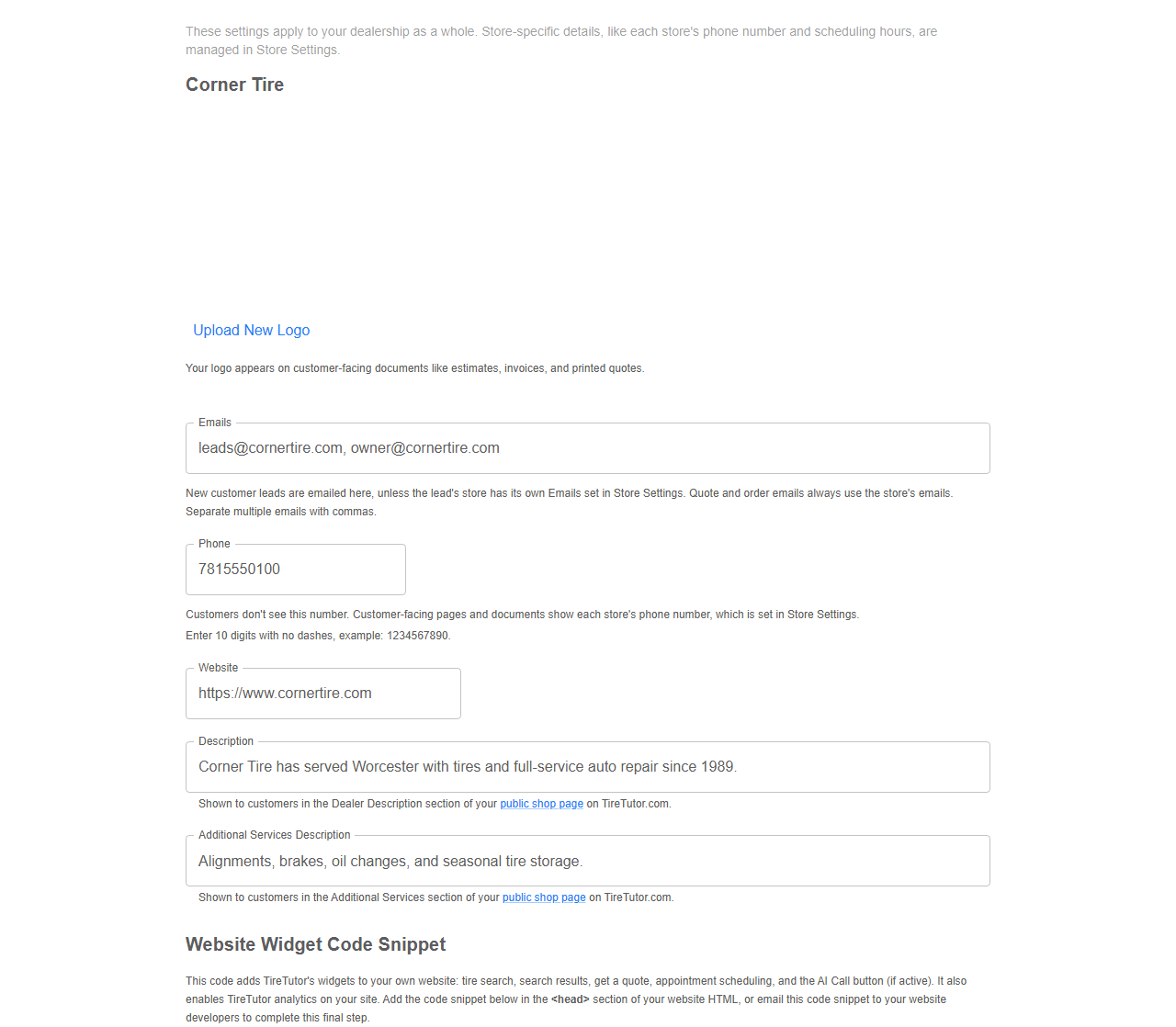
These settings apply to your dealership as a whole, so they cover every shop
under it. Anything that belongs to one shop, like its phone number, stays
under **Stores**, covered in Store settings below.
| Field | What it does |
| - | - |
| **Upload New Logo** | Your logo appears on customer-facing documents like estimates, invoices, and printed quotes. Picking a file shows it straight away, marked **(Logo Preview)**; it is your logo once you select **Update**. |
| **Emails** | New customer leads are emailed here, unless the lead's store has its own Emails set in Store settings. Quote and order emails always use the store's emails. Separate multiple emails with commas. |
| **Phone** | Customers don't see this number. Customer-facing pages and documents show each store's phone number, which is set in Store settings. Enter 10 digits with no dashes, example: 1234567890. |
| **Website** | Your own website address. |
| **Description** | Shown to customers in the Dealer Description section of your public shop page on TireTutor.com. |
| **Additional Services Description** | Shown to customers in the Additional Services section of your public shop page on TireTutor.com. |
 Select **Update**. A confirmation reading **Dealer settings updated** means it
saved.
The same screen carries your **Website Widget Code Snippet**. This code adds
TireTutor's widgets to your own website: tire search, search results, get a
quote, appointment scheduling, and the AI Call button (if active). It also
turns on TireTutor analytics for your site.
Use the copy button beside it and send it to whoever maintains your site.
### What a valid website address looks like
Type the full address, starting with `https://` — for example
`https://www.yourshop.com`. When TireTutor cannot accept what you typed, the
field names what is wrong and repeats that example:
* **Website cannot contain spaces.** Usually a stray space pasted in with the
address.
* **Website must start with https\://** The address has no `https://` in front.
* **Website must include a domain ending such as .com** The address stops at
the name, with no `.com`, `.net` or similar.
## Store settings
Open [**Settings → Organization → Stores**](https://dealers.tiretutor.com/settings/organization/stores).
Each shop has its own block, headed by the shop name, so a change to one shop
leaves the others alone.
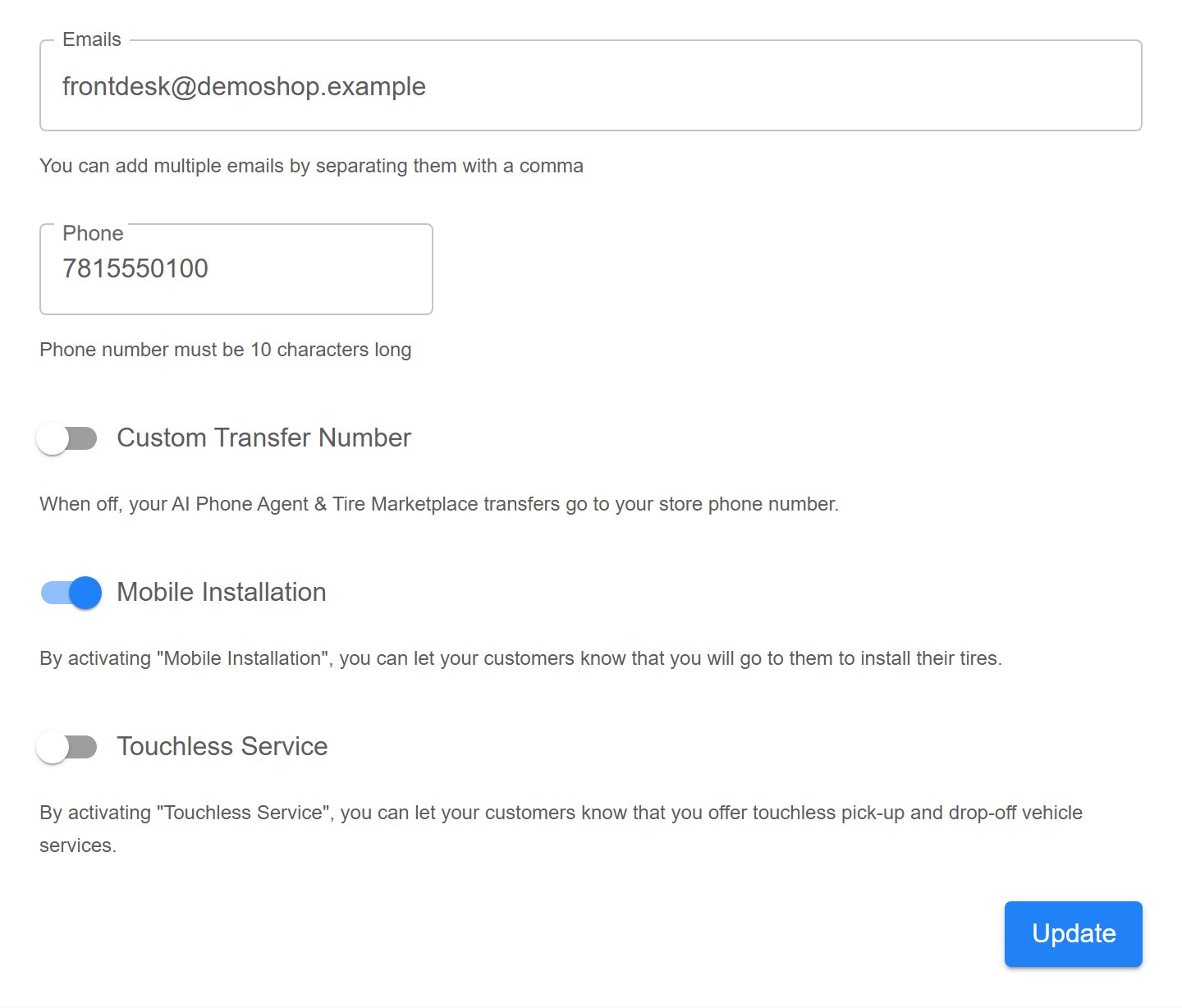
| Field | What it does |
| - | - |
| **Emails** | Where TireTutor sends notifications for this shop. Add several by separating them with a comma. |
| **Phone** | The shop's phone number, ten digits. Customers see this number, and it is where Phone Agent calls transfer unless you set a transfer number. |
| **Custom Transfer Number** | Sends Phone Agent hand-offs to a different phone. See [Changing transfer number](/dealers/ai-phone-agent/transfer-number). |
| **Mobile Installation** | Tells customers you come to them to install their tires. |
| **Touchless Service** | Tells customers you offer touchless pick-up and drop-off. |
Select **Update**. A confirmation reading **Dealer settings updated** means it
saved.
The same screen carries your **Website Widget Code Snippet**. This code adds
TireTutor's widgets to your own website: tire search, search results, get a
quote, appointment scheduling, and the AI Call button (if active). It also
turns on TireTutor analytics for your site.
Use the copy button beside it and send it to whoever maintains your site.
### What a valid website address looks like
Type the full address, starting with `https://` — for example
`https://www.yourshop.com`. When TireTutor cannot accept what you typed, the
field names what is wrong and repeats that example:
* **Website cannot contain spaces.** Usually a stray space pasted in with the
address.
* **Website must start with https\://** The address has no `https://` in front.
* **Website must include a domain ending such as .com** The address stops at
the name, with no `.com`, `.net` or similar.
## Store settings
Open [**Settings → Organization → Stores**](https://dealers.tiretutor.com/settings/organization/stores).
Each shop has its own block, headed by the shop name, so a change to one shop
leaves the others alone.
| Field | What it does |
| - | - |
| **Emails** | Where TireTutor sends notifications for this shop. Add several by separating them with a comma. |
| **Phone** | The shop's phone number, ten digits. Customers see this number, and it is where Phone Agent calls transfer unless you set a transfer number. |
| **Custom Transfer Number** | Sends Phone Agent hand-offs to a different phone. See [Changing transfer number](/dealers/ai-phone-agent/transfer-number). |
| **Mobile Installation** | Tells customers you come to them to install their tires. |
| **Touchless Service** | Tells customers you offer touchless pick-up and drop-off. |
 Select **Update** when you are done. A confirmation reading **Store settings
updated** means it saved.
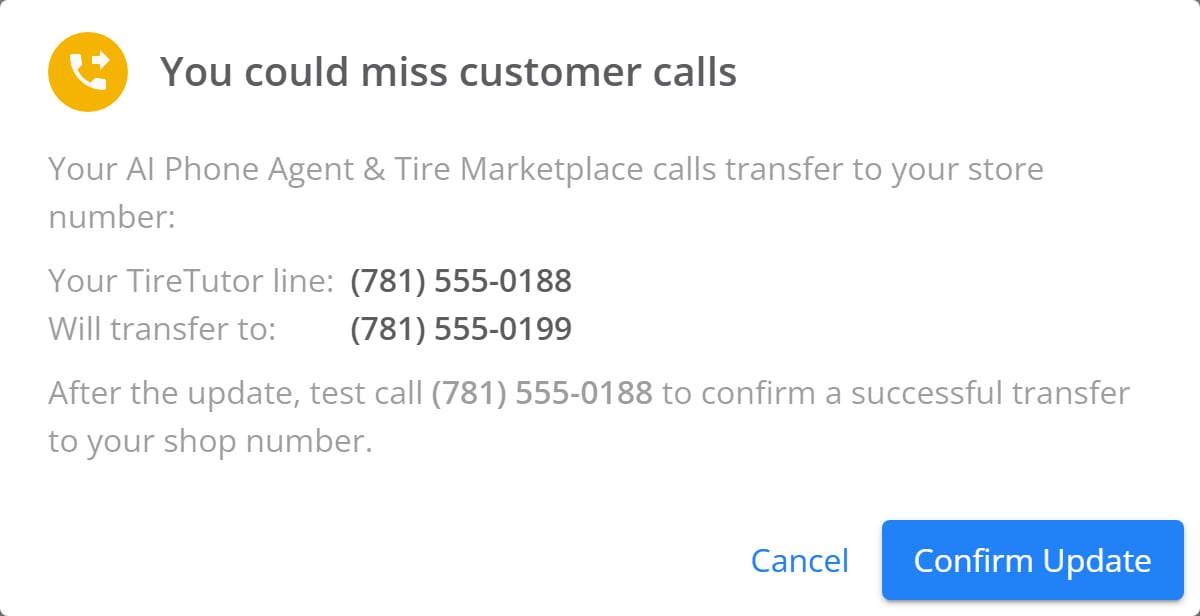
On a shop with a Phone Agent number, editing **Phone** while no transfer
number is set also moves where Phone Agent calls transfer, so TireTutor asks
you to confirm first, under the heading **You could miss customer calls**.
[Changing transfer number](/dealers/ai-phone-agent/transfer-number) covers what
to check afterwards.
Select **Update** when you are done. A confirmation reading **Store settings
updated** means it saved.
On a shop with a Phone Agent number, editing **Phone** while no transfer
number is set also moves where Phone Agent calls transfer, so TireTutor asks
you to confirm first, under the heading **You could miss customer calls**.
[Changing transfer number](/dealers/ai-phone-agent/transfer-number) covers what
to check afterwards.
 ## Checking a change went through
Reload the page. Every field reads back what you saved, so the detail you
edited is still there. If a field snaps back to its old value, the save did not
go through — try it again, and tell your TireTutor contact if it keeps
happening.
## Checking a change went through
Reload the page. Every field reads back what you saved, so the detail you
edited is still there. If a field snaps back to its old value, the save did not
go through — try it again, and tell your TireTutor contact if it keeps
happening.