> ## Documentation Index
> Fetch the complete documentation index at: https://help.tiretutor.ai/llms.txt
> Use this file to discover all available pages before exploring further.
# How to Set Up a State Tire Tax Cap
> Use this when your state requires a percentage-based tire tax but caps the amount at a fixed dollar value per tire.
## Use this when your state requires a percentage-based tire tax but caps the amount at a fixed dollar value per tire (for example, Arizona: 2% of the tire price, up to a maximum of \$4.66 per tire).
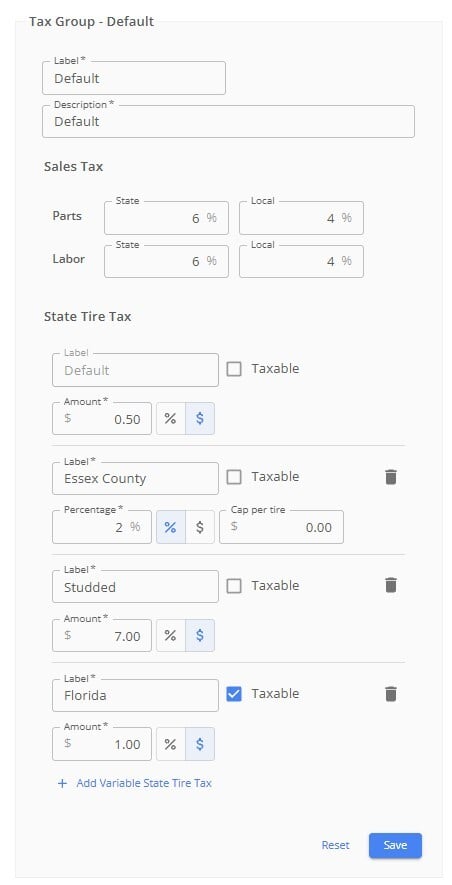 **1. Open Tax Settings.** From the left-hand menu, go to Shop Settings, then find the tax settings section.
**2. Choose your tax type.** Toggle between a flat dollar amount or a percentage. Select which you need and fill in the information.
**3. Enter your tax percentage.** For Arizona, for example, this would be 2%.
**4. Enter the per-tire cap.** In the cap field, enter the maximum dollar amount to charge per tire. For Arizona, this would be \$4.66. (Leave the cap field empty if you do not want a cap.)
**5. Save your settings.** TireTutor will now apply the lower of the two values — either the calculated percentage or the cap — to every tire on a work order.
**How it works on a work order:** The tax is applied per tire and multiplied by the tire quantity. If the tire's percentage-based tax would exceed the cap, the cap is used instead. If it's under the cap, the percentage is used.
**To override on an individual work order:** Open the work order, click into the tire tax dropdown, and adjust the dollar amount or percentage as needed, then save. This will recalculate the tax for that order only.
**1. Open Tax Settings.** From the left-hand menu, go to Shop Settings, then find the tax settings section.
**2. Choose your tax type.** Toggle between a flat dollar amount or a percentage. Select which you need and fill in the information.
**3. Enter your tax percentage.** For Arizona, for example, this would be 2%.
**4. Enter the per-tire cap.** In the cap field, enter the maximum dollar amount to charge per tire. For Arizona, this would be \$4.66. (Leave the cap field empty if you do not want a cap.)
**5. Save your settings.** TireTutor will now apply the lower of the two values — either the calculated percentage or the cap — to every tire on a work order.
**How it works on a work order:** The tax is applied per tire and multiplied by the tire quantity. If the tire's percentage-based tax would exceed the cap, the cap is used instead. If it's under the cap, the percentage is used.
**To override on an individual work order:** Open the work order, click into the tire tax dropdown, and adjust the dollar amount or percentage as needed, then save. This will recalculate the tax for that order only.