

TireTutor turns on online orders for any store that asks. If CRM has no Online Orders, ask for them on the upgrade page.
Check your menu
Open CRM in the left-hand menu.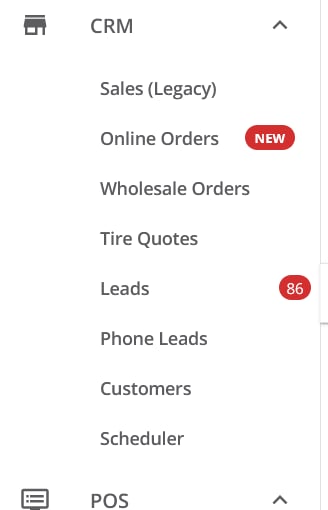
CRM for a store with online orders turned on.
Sales (Legacy) is the Sales section with a different label. Open and claim its orders the same way.
Spot an order that is waiting
A section shows a red badge with a number when it has orders waiting. With nothing waiting, it shows no badge. The red NEW next to a menu item only marks it as new; it is not a count. The Sales (Legacy) badge counts orders that nobody has claimed. An order counts until someone claims it. The Online Orders badge counts orders that nobody has opened. It clears when anyone opens Online Orders, even if nobody acts on the orders. Check the Online Orders list for orders that still need you.Where to go next
Reviewing online orders
Check what the customer paid for and what you earn, then convert or cancel the order.
Ordering tires for an order
Order the tires before the customer’s appointment.
Refunding an order
Give a customer their money back, in full or in part.
Order sources
See where each online order came from, and open the quote that led to it.
CRM notifications
What the Sales and Leads badges count, and how CRM tells you about new ones.