Find your discount rules and see who can change them.
Find your discount rules on the Discount Rules page.
Only an Owner or Administrator for the store can change discount rules.Anyone with access to the store can apply or remove a discount on a work order that is in progress. Estimates, and completed or voided work orders, have no discount option.
Open your discount rules
When: You want to find the discount rules for a store.
1
Open More Settings
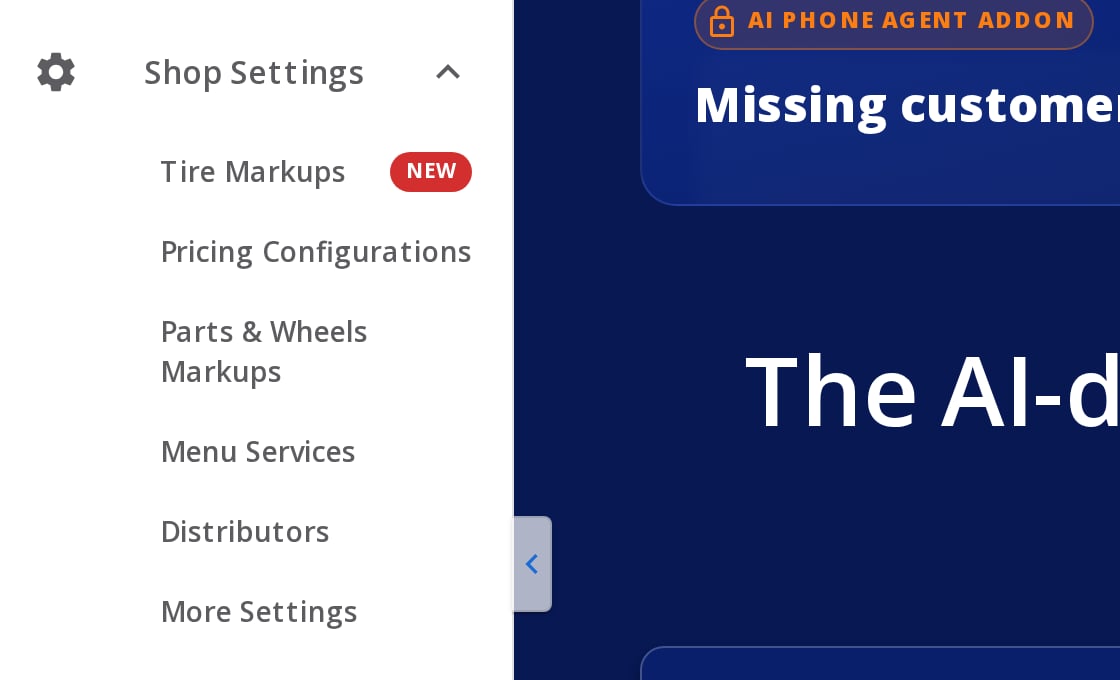
In the left menu, select Shop Settings, then More Settings. The settings page opens.
Shop Settings open in the left menu, with More Settings at the bottom.
2
Select Discount Rules
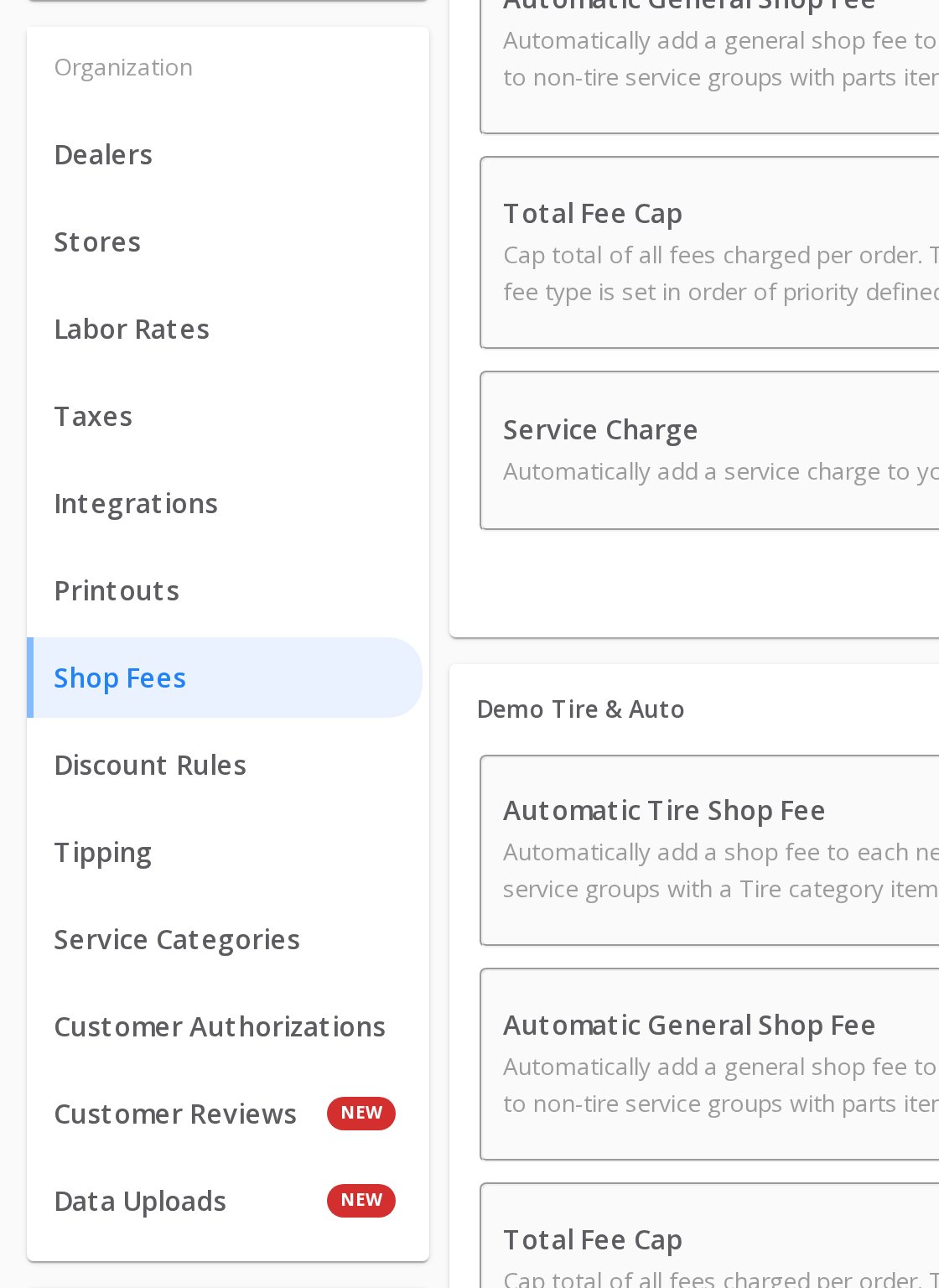
Under Organization, select Discount Rules.
The Organization list. Discount Rules is below Shop Fees.
If Shop Settings in your left menu has no More Settings under it, select Shop Settings itself. The settings page opens. Then select Organization → Discount Rules.
How discounts affect store fees
A percentage discount lowers item prices, so TireTutor figures a percentage fee on the discounted prices, before tax. A flat-dollar discount comes off the order total after fees and tax, so it does not lower a percentage fee. See Service charges.
Turn on store fees and a percentage service charge.
Overview
Learn how the Point of Sale pages fit together.
{"docsConfig":{"theme":"mint","$schema":"https://mintlify.com/docs.json","name":"TireTutor Help Center","colors":{"primary":"#2563EB","light":"#3B82F6","dark":"#1E40AF"},"logo":{"light":"https://mintcdn.com/tiretutor/t5zlRZTZFstXTcb9/logo/tiretutor-ai.png?fit=max\u0026auto=format\u0026n=t5zlRZTZFstXTcb9\u0026q=85\u0026s=78a888043867a07384c42a045cb2ca6b","dark":"https://mintcdn.com/tiretutor/t5zlRZTZFstXTcb9/logo/tiretutor-ai-dark.png?fit=max\u0026auto=format\u0026n=t5zlRZTZFstXTcb9\u0026q=85\u0026s=6cdfb9d35662c4f3398f72d522e798eb","href":"https://www.tiretutor.ai"},"favicon":"https://mintcdn.com/tiretutor/I6aLT08sS3awDfeZ/favicon-tt.svg?fit=max\u0026auto=format\u0026n=I6aLT08sS3awDfeZ\u0026q=85\u0026s=92ea207762b55bfb1ef630350e459a9c","navbar":{"links":[{"href":"https://www.tiretutor.ai/contact-us","label":"Contact us"}],"primary":{"type":"button","label":"Sign in","href":"https://dealers.tiretutor.com/login"}},"footer":{},"styling":{"latex":true},"navigation":{"pages":[]}},"deployment":{"deploymentMetadataValue":{"subdomain":"tiretutor","hasAudioNarration":false,"actualSubdomain":"tiretutor","customDomains":["help.tiretutor.ai"],"gitSource":{"type":"github","owner":"tiretutorinc","repo":"tt-docs","deployBranch":"main","contentDirectory":"public","isPrivate":true,"mountPath":"","label":""},"feedback":{"thumbs":true,"edits":true,"issues":true,"agentFeedback":true},"entitlements":{},"buildId":"6aff830c622942866f0b746a","clientVersion":"0.0.4248","searchFilterCounts":[{"language":"default","tag":"For Dealers","count":123},{"language":"default","tag":"Knowledge Base","count":48},{"language":"default","tag":"Point of Sale","count":31},{"language":"default","tag":"Dealer CRM","count":28},{"language":"default","tag":"How-to","count":21},{"language":"default","tag":"AI App Hub","count":19},{"language":"default","tag":"Settings","count":13},{"language":"default","tag":"Work orders and estimates","count":13},{"language":"default","tag":"Getting paid","count":11},{"language":"default","tag":"Pricing","count":11}],"searchSettings":{"showContentSnippets":true,"maxResults":8}},"assistantConfig":{},"basePath":"","hasChatPermissions":false,"hasWebMcpPermissions":false,"toggles":[{"name":"kill-isr","enabled":true,"variant":{"name":"disabled","enabled":false,"feature_enabled":true},"impressionData":false},{"name":"custom-rbac-roles","enabled":true,"variant":{"name":"disabled","enabled":false,"feature_enabled":true},"impressionData":false},{"name":"agent-mintlify-slack","enabled":true,"variant":{"name":"disabled","enabled":false,"feature_enabled":true},"impressionData":false},{"name":"agent-integrations-settings","enabled":true,"variant":{"name":"disabled","enabled":false,"feature_enabled":true},"impressionData":false},{"name":"rbac-expansion","enabled":true,"variant":{"name":"disabled","enabled":false,"feature_enabled":true},"impressionData":false},{"name":"automations-pr-grouping","enabled":true,"variant":{"name":"disabled","enabled":false,"feature_enabled":true},"impressionData":false},{"name":"custom-prefix","enabled":true,"variant":{"name":"disabled","enabled":false,"feature_enabled":true},"impressionData":false},{"name":"analytics-v7","enabled":true,"variant":{"name":"disabled","enabled":false,"feature_enabled":true},"impressionData":false},{"name":"user-flows-analytics","enabled":true,"variant":{"name":"disabled","enabled":false,"feature_enabled":true},"impressionData":false},{"name":"no-publish-flow","enabled":true,"variant":{"name":"disabled","enabled":false,"feature_enabled":true},"impressionData":false},{"name":"workos-onboarding","enabled":true,"variant":{"name":"disabled","enabled":false,"feature_enabled":true},"impressionData":false},{"name":"snapshot-serving-live","enabled":true,"variant":{"name":"disabled","enabled":false,"feature_enabled":true},"impressionData":false},{"name":"stripTemperatureMiddleware","enabled":true,"variant":{"name":"disabled","enabled":false,"feature_enabled":true},"impressionData":false},{"name":"support-platform-pylon-zendesk","enabled":true,"variant":{"name":"disabled","enabled":false,"feature_enabled":true},"impressionData":false},{"name":"snapshot-serving","enabled":true,"variant":{"name":"disabled","enabled":false,"feature_enabled":true},"impressionData":false},{"name":"instant-rollback","enabled":true,"variant":{"name":"disabled","enabled":false,"feature_enabled":true},"impressionData":false},{"name":"granular-notifications-server","enabled":true,"variant":{"name":"disabled","enabled":false,"feature_enabled":true},"impressionData":false},{"name":"granular-notifications","enabled":true,"variant":{"name":"disabled","enabled":false,"feature_enabled":true},"impressionData":false},{"name":"automations-fable","enabled":true,"variant":{"name":"disabled","enabled":false,"feature_enabled":true},"impressionData":false},{"name":"fixed-ai-action-pricing","enabled":true,"variant":{"name":"disabled","enabled":false,"feature_enabled":true},"impressionData":false},{"name":"site-roles","enabled":true,"variant":{"name":"disabled","enabled":false,"feature_enabled":true},"impressionData":false},{"name":"automation-resolve-merge-conflict","enabled":true,"variant":{"name":"disabled","enabled":false,"feature_enabled":true},"impressionData":false},{"name":"scoped-publishing","enabled":true,"variant":{"name":"disabled","enabled":false,"feature_enabled":true},"impressionData":false},{"name":"mintql","enabled":true,"variant":{"name":"disabled","enabled":false,"feature_enabled":true},"impressionData":false},{"name":"page-level-analytics","enabled":true,"variant":{"name":"disabled","enabled":false,"feature_enabled":true},"impressionData":false},{"name":"editor-version-history-v2","enabled":true,"variant":{"name":"disabled","enabled":false,"feature_enabled":true},"impressionData":false},{"name":"billing-page-v2","enabled":true,"variant":{"name":"disabled","enabled":false,"feature_enabled":true},"impressionData":false},{"name":"full-page-search","enabled":true,"variant":{"name":"disabled","enabled":false,"feature_enabled":true},"impressionData":false},{"name":"workspace-projects","enabled":true,"variant":{"name":"disabled","enabled":false,"feature_enabled":true},"impressionData":false},{"name":"assistant-v5","enabled":true,"variant":{"name":"disabled","enabled":false,"feature_enabled":true},"impressionData":false},{"name":"fork-pr-previews","enabled":true,"variant":{"name":"disabled","enabled":false,"feature_enabled":true},"impressionData":false},{"name":"revalidation-jwt","enabled":true,"variant":{"name":"disabled","enabled":false,"feature_enabled":true},"impressionData":false},{"name":"workos-sso-scim","enabled":true,"variant":{"name":"disabled","enabled":false,"feature_enabled":true},"impressionData":false},{"name":"hobby-abuse-scan","enabled":true,"variant":{"name":"disabled","enabled":false,"feature_enabled":true},"impressionData":false},{"name":"dashboard-inbox","enabled":true,"variant":{"name":"disabled","enabled":false,"feature_enabled":true},"impressionData":false},{"name":"workos-signup","enabled":true,"variant":{"name":"disabled","enabled":false,"feature_enabled":true},"impressionData":false},{"name":"turbopuffer-dual-write","enabled":true,"variant":{"name":"disabled","enabled":false,"feature_enabled":true},"impressionData":false},{"name":"workos-enabled","enabled":true,"variant":{"name":"disabled","enabled":false,"feature_enabled":true},"impressionData":false},{"name":"approve-review-flow","enabled":true,"variant":{"name":"disabled","enabled":false,"feature_enabled":true},"impressionData":false},{"name":"editor-metadata","enabled":true,"variant":{"name":"disabled","enabled":false,"feature_enabled":true},"impressionData":false},{"name":"sso-setup-deadline-banner","enabled":true,"variant":{"name":"disabled","enabled":false,"feature_enabled":true},"impressionData":false},{"name":"turbopuffer-serve","enabled":true,"variant":{"name":"disabled","enabled":false,"feature_enabled":true},"impressionData":false},{"name":"live-agents","enabled":true,"variant":{"name":"disabled","enabled":false,"feature_enabled":true},"impressionData":false},{"name":"starter-pricing","enabled":true,"variant":{"name":"control","enabled":true,"payload":{"type":"string","value":"control"},"feature_enabled":true},"impressionData":false},{"name":"llms-txt-v2","enabled":true,"variant":{"name":"disabled","enabled":false,"feature_enabled":true},"impressionData":false},{"name":"wildcard-email-auth","enabled":true,"variant":{"name":"disabled","enabled":false,"feature_enabled":true},"impressionData":false}],"privacy":{"consentBanner":{"enabled":true}},"googleFontsInlined":false},"customCss":[]}
{"page":{"pagePath":"dealers/pos/managing-discount-rules","slug":"/dealers/pos/managing-discount-rules","pageMetadata":{"title":"Finding your discount rules","description":"Find your discount rules and see who can change them.","keywords":["Discount Rules","discount settings","store discounts","order discount","discount permissions","work order discount","change discount rules","More Settings"],"audience":"dealer","href":"/dealers/pos/managing-discount-rules"},"description":{"compiledSource":"\"use strict\";\nconst {jsx: _jsx} = arguments[0];\nconst {useMDXComponents: _provideComponents} = arguments[0];\nfunction _createMdxContent(props) {\n const _components = {\n p: \"p\",\n ..._provideComponents(),\n ...props.components\n };\n return _jsx(_components.p, {\n children: \"Find your discount rules and see who can change them.\"\n });\n}\nfunction MDXContent(props = {}) {\n const {wrapper: MDXLayout} = {\n ..._provideComponents(),\n ...props.components\n };\n return MDXLayout ? _jsx(MDXLayout, {\n ...props,\n children: _jsx(_createMdxContent, {\n ...props\n })\n }) : _createMdxContent(props);\n}\nreturn {\n default: MDXContent\n};\n","frontmatter":{},"scope":{}},"pageType":"default","mdx":{"mdxSource":{"compiledSource":"\"use strict\";const{Fragment:_Fragment,jsx:_jsx,jsxs:_jsxs}=arguments[0];const{useMDXComponents:_provideComponents}=arguments[0];function _createMdxContent(props){const _components={a:`a`,p:`p`,strong:`strong`,..._provideComponents(),...props.components},{Card,Columns,Frame,Heading,Note,OptimizedImage,Step,Steps,Visibility}=_components;if(!Card)_missingMdxReference(`Card`,true);if(!Columns)_missingMdxReference(`Columns`,true);if(!Frame)_missingMdxReference(`Frame`,true);if(!Heading)_missingMdxReference(`Heading`,true);if(!Note)_missingMdxReference(`Note`,true);if(!OptimizedImage)_missingMdxReference(`OptimizedImage`,true);if(!Step)_missingMdxReference(`Step`,true);if(!Steps)_missingMdxReference(`Steps`,true);if(!Visibility)_missingMdxReference(`Visibility`,true);return _jsxs(_Fragment,{children:[_jsxs(_components.p,{children:[`Find your discount rules on the `,_jsx(_components.strong,{children:`Discount Rules`}),` page.`]}),`\n`,_jsxs(Note,{children:[_jsxs(_components.p,{children:[`Only an `,_jsx(_components.strong,{children:`Owner`}),` or `,_jsx(_components.strong,{children:`Administrator`}),` for the store can change discount rules.`]}),_jsx(_components.p,{children:`Anyone with access to the store can apply or remove a discount on a work order that is in progress. Estimates, and completed or voided work orders, have no discount option.`})]}),`\n`,_jsx(Heading,{level:`2`,id:`open-your-discount-rules`,children:`Open your discount rules`}),`\n`,_jsxs(_components.p,{children:[_jsx(_components.strong,{children:`When:`}),` You want to find the discount rules for a store.`]}),`\n`,_jsxs(Steps,{children:[_jsxs(Step,{title:`Open More Settings`,children:[_jsxs(_components.p,{children:[`In the left menu, select `,_jsx(_components.strong,{children:`Shop Settings`}),`, then `,_jsx(_components.strong,{children:`More Settings`}),`. The settings page opens.`]}),_jsx(Frame,{caption:`Shop Settings open in the left menu, with More Settings at the bottom.`,children:_jsx(OptimizedImage,{src:`https://mintcdn.com/tiretutor/1Xpwys7OBunwQXOm/images/pos/sidebar-shop-settings-open-desktop.png?fit=max\u0026auto=format\u0026n=1Xpwys7OBunwQXOm\u0026q=85\u0026s=06fef6761d57c72fdb2f0393bb4ea41f`,alt:`The left menu with Shop Settings open. Under it are Tire Markups, Pricing Configurations, Parts and Wheels Markups, Menu Services, Distributors and More Settings.`,\"data-og-width\":`1120`,width:`1120`,\"data-og-height\":`680`,height:`680`,\"data-path\":`images/pos/sidebar-shop-settings-open-desktop.png`,\"data-optimize\":`true`,\"data-opv\":`3`,srcset:`https://mintcdn.com/tiretutor/1Xpwys7OBunwQXOm/images/pos/sidebar-shop-settings-open-desktop.png?w=280\u0026fit=max\u0026auto=format\u0026n=1Xpwys7OBunwQXOm\u0026q=85\u0026s=1a17f406cf7ff519ba55661dc73d0d96 280w, https://mintcdn.com/tiretutor/1Xpwys7OBunwQXOm/images/pos/sidebar-shop-settings-open-desktop.png?w=560\u0026fit=max\u0026auto=format\u0026n=1Xpwys7OBunwQXOm\u0026q=85\u0026s=922202a348c39d5e6042943488139364 560w, https://mintcdn.com/tiretutor/1Xpwys7OBunwQXOm/images/pos/sidebar-shop-settings-open-desktop.png?w=840\u0026fit=max\u0026auto=format\u0026n=1Xpwys7OBunwQXOm\u0026q=85\u0026s=66c840625e58a16c5fdd554f968f2067 840w, https://mintcdn.com/tiretutor/1Xpwys7OBunwQXOm/images/pos/sidebar-shop-settings-open-desktop.png?w=1100\u0026fit=max\u0026auto=format\u0026n=1Xpwys7OBunwQXOm\u0026q=85\u0026s=839d9cb5681197e5cfc86460127023a2 1100w, https://mintcdn.com/tiretutor/1Xpwys7OBunwQXOm/images/pos/sidebar-shop-settings-open-desktop.png?w=1650\u0026fit=max\u0026auto=format\u0026n=1Xpwys7OBunwQXOm\u0026q=85\u0026s=53c4a82b3ab07d96ee254b4f070afec8 1650w, https://mintcdn.com/tiretutor/1Xpwys7OBunwQXOm/images/pos/sidebar-shop-settings-open-desktop.png?w=2500\u0026fit=max\u0026auto=format\u0026n=1Xpwys7OBunwQXOm\u0026q=85\u0026s=8ac259c9b5b0cffd7ae2780db284ae4c 2500w`})})]}),_jsxs(Step,{title:`Select Discount Rules`,children:[_jsxs(_components.p,{children:[`Under `,_jsx(_components.strong,{children:`Organization`}),`, select `,_jsx(_components.strong,{children:`Discount Rules`}),`.`]}),_jsx(Frame,{caption:`The Organization list. Discount Rules is below Shop Fees.`,children:_jsx(OptimizedImage,{src:`https://mintcdn.com/tiretutor/1Xpwys7OBunwQXOm/images/pos/shop-fees-settings-nav-desktop.png?fit=max\u0026auto=format\u0026n=1Xpwys7OBunwQXOm\u0026q=85\u0026s=ecd4fd321d3b90b58461610fc68eb36c`,alt:`The settings links under Organization: Dealers, Stores, Labor Rates, Taxes, Integrations, Printouts, Shop Fees, Discount Rules and more. Shop Fees is selected.`,\"data-og-width\":`1120`,width:`1120`,\"data-og-height\":`1536`,height:`1536`,\"data-path\":`images/pos/shop-fees-settings-nav-desktop.png`,\"data-optimize\":`true`,\"data-opv\":`3`,srcset:`https://mintcdn.com/tiretutor/1Xpwys7OBunwQXOm/images/pos/shop-fees-settings-nav-desktop.png?w=280\u0026fit=max\u0026auto=format\u0026n=1Xpwys7OBunwQXOm\u0026q=85\u0026s=0f5e0d5c71aea71efdc830e695fddb32 280w, https://mintcdn.com/tiretutor/1Xpwys7OBunwQXOm/images/pos/shop-fees-settings-nav-desktop.png?w=560\u0026fit=max\u0026auto=format\u0026n=1Xpwys7OBunwQXOm\u0026q=85\u0026s=b92a635c262d6ac3e3de6e783034ca5b 560w, https://mintcdn.com/tiretutor/1Xpwys7OBunwQXOm/images/pos/shop-fees-settings-nav-desktop.png?w=840\u0026fit=max\u0026auto=format\u0026n=1Xpwys7OBunwQXOm\u0026q=85\u0026s=65e0d10261f3c0ac00bcc6a71799b7e3 840w, https://mintcdn.com/tiretutor/1Xpwys7OBunwQXOm/images/pos/shop-fees-settings-nav-desktop.png?w=1100\u0026fit=max\u0026auto=format\u0026n=1Xpwys7OBunwQXOm\u0026q=85\u0026s=15c311966f2e80668fab660b112bfddb 1100w, https://mintcdn.com/tiretutor/1Xpwys7OBunwQXOm/images/pos/shop-fees-settings-nav-desktop.png?w=1650\u0026fit=max\u0026auto=format\u0026n=1Xpwys7OBunwQXOm\u0026q=85\u0026s=34aff7f96534894639c830362122f28f 1650w, https://mintcdn.com/tiretutor/1Xpwys7OBunwQXOm/images/pos/shop-fees-settings-nav-desktop.png?w=2500\u0026fit=max\u0026auto=format\u0026n=1Xpwys7OBunwQXOm\u0026q=85\u0026s=ed08f90e95fc3b730c83e18e25042694 2500w`})})]})]}),`\n`,_jsx(Note,{children:_jsxs(_components.p,{children:[`If `,_jsx(_components.strong,{children:`Shop Settings`}),` in your left menu has no `,_jsx(_components.strong,{children:`More Settings`}),` under it, select `,_jsx(_components.strong,{children:`Shop Settings`}),` itself. The settings page opens. Then select `,_jsx(_components.strong,{children:`Organization → Discount Rules`}),`.`]})}),`\n`,_jsx(Heading,{level:`2`,id:`how-discounts-affect-store-fees`,children:`How discounts affect store fees`}),`\n`,_jsxs(_components.p,{children:[`A percentage discount lowers item prices, so TireTutor figures a percentage fee on the discounted prices, before tax. A flat-dollar discount comes off the order total after fees and tax, so it does not lower a percentage fee. See `,_jsx(_components.a,{href:`/dealers/pos/service-charges`,children:`Service charges`}),`.`]}),`\n`,_jsxs(Visibility,{for:`humans`,children:[_jsx(Heading,{level:`2`,id:`still-need-help`,children:`Still need help?`}),_jsxs(_components.p,{children:[`Contact support through the `,_jsx(_components.a,{href:`https://tiretutor.com/contact`,children:`contact form`}),`, or call `,_jsx(_components.a,{href:`tel:+18554004521`,children:`855-400-4521`}),`.`]}),_jsx(Heading,{level:`2`,id:`where-to-go-next`,children:`Where to go next`}),_jsxs(Columns,{cols:2,children:[_jsx(Card,{title:`Service charges`,icon:`percent`,href:`/dealers/pos/service-charges`,children:_jsx(_components.p,{children:`Turn on store fees and a percentage service charge.`})}),_jsx(Card,{title:`Overview`,icon:`book`,href:`/dealers/pos/overview`,children:_jsx(_components.p,{children:`Learn how the Point of Sale pages fit together.`})})]})]})]})}function MDXContent(props={}){const{wrapper:MDXLayout}={..._provideComponents(),...props.components};return MDXLayout?_jsx(MDXLayout,{...props,children:_jsx(_createMdxContent,{...props})}):_createMdxContent(props)}return{default:MDXContent};function _missingMdxReference(id,component){throw new Error(`Expected `+(component?`component`:`object`)+\" `\"+id+\"` to be defined: you likely forgot to import, pass, or provide it.\")}","frontmatter":{},"scope":{"config":{},"pageMetadata":{"title":"Finding your discount rules","description":"Find your discount rules and see who can change them.","keywords":["Discount Rules","discount settings","store discounts","order discount","discount permissions","work order discount","change discount rules","More Settings"],"audience":"dealer","href":"/dealers/pos/managing-discount-rules"}}},"mdxSourceWithNoJs":null},"mdxExtracts":{"tableOfContents":[{"title":"Open your discount rules","slug":"open-your-discount-rules","depth":2,"children":[]},{"title":"How discounts affect store fees","slug":"how-discounts-affect-store-fees","depth":2,"children":[]},{"title":"Still need help?","slug":"still-need-help","depth":2,"children":[]},{"title":"Where to go next","slug":"where-to-go-next","depth":2,"children":[]}],"codeExamples":{}},"jsLinks":[],"subdomain":"tiretutor","siteName":"TireTutor Help Center","title":"Finding your discount rules - TireTutor Help Center","navMaps":{"firstHrefInVersion":{},"firstHrefInLanguage":{}},"lastModified":"2026-11-02T20:59:00.865Z","originalFileLocation":"dealers/pos/managing-discount-rules.mdx"},"headHtml":"\u003cscript data-mint-head>(function(){var d=document.documentElement,p=null;if(!p){try{p=localStorage.getItem(\"isDarkMode\")}catch(e){}if(p==='true')p='dark';else if(p==='false')p='light';if(p!=='light'\u0026\u0026p!=='dark'\u0026\u0026p!=='system')p=\"system\"}var r=p==='system'?(matchMedia(\"(prefers-color-scheme: dark)\").matches?'dark':'light'):p;d.classList.remove(r==='dark'?'light':'dark');d.classList.add(r);d.setAttribute(\"data-theme-preference\",p)})();\u003c/script>\u003cmeta data-mint-head name=\"description\" content=\"Find your discount rules and see who can change them.\">\u003cmeta data-mint-head name=\"application-name\" content=\"TireTutor Help Center\">\u003cmeta data-mint-head name=\"generator\" content=\"Mintlify\">\u003clink data-mint-head rel=\"icon\" type=\"image/png\" sizes=\"192x192\" href=\"/mintlify-assets/_mintlify/favicons/tiretutor/0m8aGYjTkuHPuQpQ/_generated/favicon/android-chrome-192x192.png\" media=\"(prefers-color-scheme: light)\">\u003clink data-mint-head rel=\"apple-touch-icon\" type=\"image/png\" sizes=\"180x180\" href=\"/mintlify-assets/_mintlify/favicons/tiretutor/0m8aGYjTkuHPuQpQ/_generated/favicon/apple-touch-icon.png\">\u003clink data-mint-head rel=\"icon\" type=\"image/png\" sizes=\"16x16\" href=\"/mintlify-assets/_mintlify/favicons/tiretutor/0m8aGYjTkuHPuQpQ/_generated/favicon/favicon-16x16.png\" media=\"(prefers-color-scheme: light)\">\u003clink data-mint-head rel=\"icon\" type=\"image/png\" sizes=\"32x32\" href=\"/mintlify-assets/_mintlify/favicons/tiretutor/0m8aGYjTkuHPuQpQ/_generated/favicon/favicon-32x32.png\" media=\"(prefers-color-scheme: light)\">\u003clink data-mint-head rel=\"shortcut icon\" type=\"image/x-icon\" href=\"/mintlify-assets/_mintlify/favicons/tiretutor/0m8aGYjTkuHPuQpQ/_generated/favicon/favicon.ico\" media=\"(prefers-color-scheme: light)\">\u003clink data-mint-head rel=\"icon\" type=\"image/png\" sizes=\"192x192\" href=\"/mintlify-assets/_mintlify/favicons/tiretutor/0m8aGYjTkuHPuQpQ/_generated/favicon-dark/android-chrome-192x192.png\" media=\"(prefers-color-scheme: dark)\">\u003clink data-mint-head rel=\"icon\" type=\"image/png\" sizes=\"16x16\" href=\"/mintlify-assets/_mintlify/favicons/tiretutor/0m8aGYjTkuHPuQpQ/_generated/favicon-dark/favicon-16x16.png\" media=\"(prefers-color-scheme: dark)\">\u003clink data-mint-head rel=\"icon\" type=\"image/png\" sizes=\"32x32\" href=\"/mintlify-assets/_mintlify/favicons/tiretutor/0m8aGYjTkuHPuQpQ/_generated/favicon-dark/favicon-32x32.png\" media=\"(prefers-color-scheme: dark)\">\u003clink data-mint-head rel=\"shortcut icon\" type=\"image/x-icon\" href=\"/mintlify-assets/_mintlify/favicons/tiretutor/0m8aGYjTkuHPuQpQ/_generated/favicon-dark/favicon.ico\" media=\"(prefers-color-scheme: dark)\">\u003cmeta data-mint-head property=\"og:title\" content=\"Finding your discount rules - TireTutor Help Center\">\u003cmeta data-mint-head property=\"og:description\" content=\"Find your discount rules and see who can change them.\">\u003cmeta data-mint-head property=\"og:site_name\" content=\"TireTutor Help Center\">\u003cmeta data-mint-head property=\"og:url\" content=\"https://help.tiretutor.ai/dealers/pos/managing-discount-rules\">\u003cmeta data-mint-head property=\"og:type\" content=\"website\">\u003cmeta data-mint-head property=\"og:image\" content=\"https://tiretutor.mintlify.site/_mintlify/api/og/v2?division=Work+orders+and+estimates\u0026amp;title=Finding+your+discount+rules\u0026amp;description=Find+your+discount+rules+and+see+who+can+change+them.\u0026amp;theme=36fb3f506f50fac9d48e4ee3\u0026amp;signature=b3284fc12567139f842532570a34559a67562e295f0790fa011a9753054c8118\">\u003cmeta data-mint-head property=\"og:image:width\" content=\"1200\">\u003cmeta data-mint-head property=\"og:image:height\" content=\"630\">\u003cmeta data-mint-head name=\"twitter:card\" content=\"summary_large_image\">\u003cmeta data-mint-head name=\"twitter:title\" content=\"Finding your discount rules - TireTutor Help Center\">\u003cmeta data-mint-head name=\"twitter:description\" content=\"Find your discount rules and see who can change them.\">\u003cmeta data-mint-head name=\"twitter:image\" content=\"https://tiretutor.mintlify.site/_mintlify/api/og/v2?division=Work+orders+and+estimates\u0026amp;title=Finding+your+discount+rules\u0026amp;description=Find+your+discount+rules+and+see+who+can+change+them.\u0026amp;theme=36fb3f506f50fac9d48e4ee3\u0026amp;signature=b3284fc12567139f842532570a34559a67562e295f0790fa011a9753054c8118\">\u003cmeta data-mint-head name=\"twitter:image:width\" content=\"1200\">\u003cmeta data-mint-head name=\"twitter:image:height\" content=\"630\">\u003cmeta data-mint-head name=\"msapplication-config\" content=\"/mintlify-assets/_mintlify/favicons/tiretutor/0m8aGYjTkuHPuQpQ/_generated/favicon/browserconfig.xml\">\u003cmeta data-mint-head name=\"apple-mobile-web-app-title\" content=\"TireTutor Help Center\">\u003cmeta data-mint-head name=\"msapplication-TileColor\" content=\"#2563EB\">\u003clink data-mint-head rel=\"canonical\" href=\"https://help.tiretutor.ai/dealers/pos/managing-discount-rules\">\u003clink data-mint-head rel=\"alternate\" type=\"application/xml\" href=\"/sitemap.xml\">\u003clink data-mint-head rel=\"alternate\" type=\"text/markdown\" href=\"/dealers/pos/managing-discount-rules.md\">\u003cscript data-mint-head type=\"application/ld+json\">{\"@context\":\"https://schema.org\",\"@graph\":[{\"@type\":\"Organization\",\"@id\":\"https://help.tiretutor.ai/#organization\",\"name\":\"TireTutor Help Center\",\"url\":\"https://help.tiretutor.ai\",\"logo\":{\"@type\":\"ImageObject\",\"url\":\"https://mintcdn.com/tiretutor/t5zlRZTZFstXTcb9/logo/tiretutor-ai.png?fit=max\u0026auto=format\u0026n=t5zlRZTZFstXTcb9\u0026q=85\u0026s=78a888043867a07384c42a045cb2ca6b\"}},{\"@type\":\"WebSite\",\"@id\":\"https://help.tiretutor.ai#website\",\"name\":\"TireTutor Help Center\",\"url\":\"https://help.tiretutor.ai\",\"publisher\":{\"@id\":\"https://help.tiretutor.ai/#organization\"}},{\"@type\":\"WebPage\",\"@id\":\"https://help.tiretutor.ai/dealers/pos/managing-discount-rules#webpage\",\"url\":\"https://help.tiretutor.ai/dealers/pos/managing-discount-rules\",\"name\":\"Finding your discount rules\",\"description\":\"Find your discount rules and see who can change them.\",\"dateModified\":\"2026-11-02T20:59:00.865Z\",\"isPartOf\":{\"@id\":\"https://help.tiretutor.ai#website\"},\"breadcrumb\":{\"@id\":\"https://help.tiretutor.ai/dealers/pos/managing-discount-rules#breadcrumb\"}},{\"@type\":\"BreadcrumbList\",\"@id\":\"https://help.tiretutor.ai/dealers/pos/managing-discount-rules#breadcrumb\",\"itemListElement\":[{\"@type\":\"ListItem\",\"position\":1,\"name\":\"Point of Sale\",\"item\":\"https://help.tiretutor.ai/dealers/pos/overview\"},{\"@type\":\"ListItem\",\"position\":2,\"name\":\"Work orders and estimates\",\"item\":\"https://help.tiretutor.ai/dealers/pos/managing-work-orders\"},{\"@type\":\"ListItem\",\"position\":3,\"name\":\"Finding your discount rules\",\"item\":\"https://help.tiretutor.ai/dealers/pos/managing-discount-rules\"}]},{\"@type\":[\"Article\",\"TechArticle\"],\"@id\":\"https://help.tiretutor.ai/dealers/pos/managing-discount-rules#article\",\"headline\":\"Finding your discount rules\",\"name\":\"Finding your discount rules\",\"description\":\"Find your discount rules and see who can change them.\",\"url\":\"https://help.tiretutor.ai/dealers/pos/managing-discount-rules\",\"mainEntityOfPage\":{\"@id\":\"https://help.tiretutor.ai/dealers/pos/managing-discount-rules#webpage\"},\"dateModified\":\"2026-11-02T20:59:00.865Z\",\"keywords\":\"Discount Rules, discount settings, store discounts, order discount, discount permissions, work order discount, change discount rules, More Settings\",\"publisher\":{\"@id\":\"https://help.tiretutor.ai/#organization\"},\"isPartOf\":{\"@id\":\"https://help.tiretutor.ai#website\"}}]}\u003c/script>\u003cscript data-mint-head type=\"application/ld+json\">{\"@context\":\"https://schema.org\",\"@type\":\"WebSite\",\"name\":\"TireTutor Help Center\",\"publisher\":{\"@type\":\"Organization\",\"name\":\"TireTutor Help Center\"},\"provider\":{\"@type\":\"Organization\",\"name\":\"Mintlify\",\"url\":\"https://mintlify.com\"}}\u003c/script>","agentPointerHref":"/dealers/pos/managing-discount-rules.md","siteName":"TireTutor Help Center","nav":{"global":null,"tabs":[{"tab":"Home","pages":[{"title":"Home","href":""}]},{"tab":"For Dealers","groups":[{"group":"Start here","pages":[{"title":"What you can do","href":"/dealers"},{"title":"TireTutor Training Videos","href":"/dealers/training-videos"}]},{"group":"Getting started","pages":[{"title":"Create your TireTutor account","href":"/dealers/settings/creating-your-account"},{"title":"Claim your dealer account","href":"/dealers/settings/claiming-your-dealer-account"},{"title":"Claim your dealer account from your link","href":"/dealers/settings/claiming-your-dealer-account-from-your-link"},{"title":"Set up your store after you sign up","href":"/dealers/settings/setting-up-your-shop"},{"title":"Order tires as a Tire One dealer","href":"/dealers/onboarding/ordering-tires-as-a-tire-one-dealer"},{"title":"Use your setup checklist","href":"/dealers/onboarding/using-your-setup-checklist"},{"title":"Get help on any page","href":"/dealers/onboarding/getting-help-on-any-page"}]},{"group":"Point of Sale","pages":[{"title":"Overview","href":"/dealers/pos/overview"},{"group":"Work orders and estimates","expanded":true,"pages":[{"title":"Creating a work order","href":"/dealers/pos/managing-work-orders"},{"title":"Adding a vehicle","href":"/dealers/pos/adding-a-vehicle"},{"title":"Managing service search results","href":"/dealers/pos/managing-service-search-results"},{"title":"Service charges","description":"Turn on store fees and a percentage service charge, and change the charge on one order.","href":"/dealers/pos/service-charges"},{"title":"Finding your discount rules","href":"/dealers/pos/managing-discount-rules"},{"title":"Printing tire comparisons","description":"Compare selected tires and print their prices, sizes, and SKUs for a customer.","href":"/dealers/pos/printing-tire-comparisons"},{"title":"Sending estimates to customers","href":"/dealers/pos/sending-estimates"},{"title":"Customer authorizations","href":"/dealers/pos/managing-customer-authorizations"},{"title":"Assigning staff to a work order","href":"/dealers/pos/managing-staff-attribution"},{"title":"Planning work on the Bay Board","href":"/dealers/pos/managing-shop-load"},{"title":"Viewing gross profit","href":"/dealers/pos/viewing-gross-profit"},{"title":"Reopening a work order","href":"/dealers/pos/reopening-work-orders"},{"title":"Voiding a work order","href":"/dealers/pos/voiding-work-orders"}]},{"group":"Parts and tires","expanded":true,"pages":[{"title":"Ordering parts with PartsTech","href":"/dealers/pos/ordering-parts-with-partstech"},{"title":"Finding parts on Amazon","href":"/dealers/pos/using-amazon-linkout"},{"title":"Managing non-catalog tires","href":"/dealers/pos/managing-non-catalog-tires"},{"title":"Managing product images","href":"/dealers/pos/managing-product-images"}]},{"group":"Getting paid","expanded":true,"pages":[{"title":"Square setup","href":"/dealers/pos/square-setup"},{"title":"Square Terminal","href":"/dealers/pos/square-terminal"},{"title":"Taking payments","href":"/dealers/pos/taking-payments"},{"title":"Taking deposits","href":"/dealers/pos/taking-deposits"},{"group":"Digital invoices and payments","expanded":true,"pages":[{"title":"Overview","href":"/dealers/pos/digital-invoices-overview"},{"title":"Text to Pay and Tap to Pay","href":"/dealers/pos/managing-payment-links"},{"title":"Taking a card over the phone","href":"/dealers/pos/taking-phone-payments"}]},{"title":"Taking charge account payments","href":"/dealers/pos/taking-charge-account-payments"},{"title":"Managing national accounts","href":"/dealers/pos/managing-national-accounts"},{"title":"Square messaging","href":"/dealers/pos/square-messaging"},{"title":"Payment disputes","href":"/dealers/pos/managing-payment-disputes"}]},{"group":"Reports","expanded":true,"pages":[{"title":"Viewing reports","href":"/dealers/pos/viewing-reports"},{"title":"Exporting reports","href":"/dealers/pos/exporting-reports"}]}]},{"group":"Pricing","pages":[{"title":"Overview","href":"/dealers/pricing/overview"},{"title":"Getting started","href":"/dealers/pricing/getting-started"},{"title":"Switching from a custom pricing feed","href":"/dealers/pricing/switching-from-a-custom-pricing-feed"},{"title":"Choose a tire markup preset","href":"/dealers/pricing/choosing-a-tire-markup-preset"},{"title":"Get prices in the Tire Catalog","href":"/dealers/pricing/getting-prices-in-the-tire-catalog"},{"title":"Find your distributor's tires in the Tire Catalog","href":"/dealers/pricing/managing-the-distributors-filter"},{"title":"Managing your installation fee","href":"/dealers/pricing/managing-installation-fees"},{"title":"Managing parts and wheel markups","href":"/dealers/pricing/managing-parts-and-wheel-markups"},{"title":"Pricing one store differently","href":"/dealers/pricing/managing-store-pricing"},{"title":"How your price is calculated","href":"/dealers/pricing/how-it-works"},{"title":"Markup reference","href":"/dealers/pricing/reference"}]},{"group":"Accounting","pages":[{"title":"Overview","href":"/dealers/accounting/overview"},{"title":"Sort sales into QuickBooks accounts","href":"/dealers/accounting/managing-quickbooks-income-accounts"}]},{"group":"Dealer CRM","pages":[{"title":"Managing customers","href":"/dealers/crm/managing-customers"},{"title":"Messaging a customer about a lead","href":"/dealers/crm/messaging-a-lead"},{"title":"Customizing the menu","href":"/dealers/crm/customizing-the-menu"},{"group":"Team and time clock","icon":"users","expanded":true,"pages":[{"title":"Managing your team","href":"/dealers/crm/managing-your-team"},{"title":"Managing employee PINs","href":"/dealers/crm/managing-employee-pins"},{"title":"Switching to your login with a PIN","href":"/dealers/crm/switching-to-your-login-with-a-pin"},{"title":"Clocking in with a PIN","href":"/dealers/crm/tracking-time-with-a-pin"}]},{"group":"Online orders","icon":"cart-shopping","expanded":true,"pages":[{"title":"Finding your online orders","href":"/dealers/online-orders/finding-your-orders"},{"title":"Reviewing online orders","href":"/dealers/online-orders/reviewing-online-orders"},{"title":"Order sources","href":"/dealers/online-orders/order-source-reference"},{"title":"Ordering tires for an order","href":"/dealers/online-orders/ordering-tires-for-an-order"},{"title":"Managing online order taxes","href":"/dealers/online-orders/managing-online-order-taxes"},{"title":"Refunding an order","href":"/dealers/online-orders/refunding-an-order"}]},{"group":"Notifications","expanded":true,"pages":[{"title":"How it works","href":"/dealers/crm-notifications/how-it-works"},{"title":"Managing customer replies","href":"/dealers/crm-notifications/managing-customer-replies"},{"title":"Managing alert sounds","href":"/dealers/crm-notifications/managing-alert-sounds"}]},{"group":"Customer Marketing","icon":"envelope","expanded":true,"pages":[{"title":"Overview","href":"/dealers/sms-remarketing/overview"},{"title":"Getting started","href":"/dealers/sms-remarketing/getting-started"},{"title":"Service names that trigger reminders","href":"/dealers/sms-remarketing/service-naming"},{"title":"How it works","href":"/dealers/sms-remarketing/how-it-works"},{"title":"Managing opt-outs","href":"/dealers/sms-remarketing/managing-opt-outs"},{"title":"Reference","href":"/dealers/sms-remarketing/reference"}]},{"group":"Scheduler","icon":"calendar-days","expanded":true,"pages":[{"title":"Overview","href":"/dealers/scheduler/overview"},{"title":"Filtering the schedule","href":"/dealers/scheduler/filtering-the-schedule"},{"title":"Asking AI about your schedule","href":"/dealers/scheduler/asking-ai-about-your-schedule"},{"title":"Managing arrival-order scheduling","href":"/dealers/scheduler/managing-arrival-order"}]},{"group":"Google Book Online","icon":"calendar-check","expanded":true,"pages":[{"title":"Overview","href":"/dealers/google-book-online/overview"},{"title":"Managing bookings from Google","href":"/dealers/google-book-online/managing-google-book-online"}]}]},{"group":"Website","pages":[{"title":"Overview","href":"/dealers/website/overview"},{"title":"Getting started","href":"/dealers/website/getting-started"},{"title":"Managing pages and menus","href":"/dealers/website/managing-pages"},{"title":"Managing page content and images","href":"/dealers/website/managing-page-content"},{"title":"Managing site settings","href":"/dealers/website/managing-site-settings"},{"title":"Managing store details","href":"/dealers/website/managing-shop-details"},{"title":"Managing your setup guide and site health","href":"/dealers/website/managing-site-health"},{"title":"Managing your domain","href":"/dealers/website/managing-your-domain"},{"title":"Your rebates page","href":"/dealers/website/rebates-page"},{"title":"Reference","href":"/dealers/website/reference"}]},{"group":"AI App Hub","pages":[{"group":"Custom Car Agent","icon":"car","expanded":true,"pages":[{"title":"Overview","href":"/dealers/wheel-visualizer"},{"title":"Sending a design to a customer","href":"/dealers/wheel-visualizer/sending-a-design"}]},{"group":"Digital Vehicle Inspection","icon":"clipboard-check","expanded":true,"pages":[{"title":"Overview","href":"/dealers/dvi/overview"},{"title":"Getting started","href":"/dealers/dvi/getting-started"},{"title":"Performing an inspection","href":"/dealers/dvi/performing-inspections"},{"title":"Recommended services","href":"/dealers/dvi/recommended-services"},{"title":"Customer report","href":"/dealers/dvi/customer-report"},{"title":"Managing notifications","href":"/dealers/dvi/managing-notifications"},{"title":"How the AI features work","href":"/dealers/dvi/how-it-works"},{"title":"Notification reference","href":"/dealers/dvi/reference"}]},{"group":"Marketing Agent","icon":"bullhorn","expanded":true,"pages":[{"title":"Overview","href":"/dealers/marketing-agent/overview"},{"title":"Getting started","href":"/dealers/marketing-agent/getting-started"},{"title":"Managing advertising","href":"/dealers/marketing-agent/managing-advertising"}]},{"group":"Phone Agent","icon":"phone","expanded":true,"pages":[{"title":"Overview","href":"/dealers/ai-phone-agent/overview"},{"title":"Changing transfer number","href":"/dealers/ai-phone-agent/transfer-number"},{"title":"Transfer call notifications","href":"/dealers/ai-phone-agent/transfer-notifications"},{"title":"Tire quote notifications","href":"/dealers/ai-phone-agent/quote-notifications"}]},{"group":"Tutor AI","icon":"sparkles","expanded":true,"pages":[{"title":"Overview","href":"/dealers/tutor/overview"},{"title":"Getting started","href":"/dealers/tutor/getting-started"}]}]},{"group":"Settings","pages":[{"title":"Dealer and Store settings","href":"/dealers/settings/dealer-and-store-settings"},{"title":"Connect your distributors","href":"/dealers/settings/managing-distributors"},{"title":"Connect K\u0026M Tire with your account number","href":"/dealers/settings/managing-km-tire-requests"},{"title":"Turn on CARFAX","href":"/dealers/settings/turning-on-carfax"},{"group":"Email security","icon":"shield-check","expanded":true,"pages":[{"title":"Overview","href":"/dealers/email-security/overview"},{"title":"Checking your setup","href":"/dealers/email-security/getting-started"},{"title":"Getting the records set up","href":"/dealers/email-security/managing-email-security"},{"title":"Records and further reading","href":"/dealers/email-security/reference"}]},{"group":"Email transfer","icon":"envelope","expanded":true,"pages":[{"title":"Moving your email to a new provider","sidebarTitle":"Moving your email","href":"/dealers/email-transfer/managing-email-transfer"},{"title":"Fixing email that stops at Google's daily limit","sidebarTitle":"Daily sending limit","href":"/dealers/email-transfer/managing-google-sending-limits"},{"group":"Provider-specific instructions","expanded":true,"pages":[{"title":"Moving your email to Google Workspace","sidebarTitle":"Google Workspace","href":"/dealers/email-transfer/moving-to-google-workspace"},{"title":"Moving your email to Microsoft 365","sidebarTitle":"Microsoft 365","href":"/dealers/email-transfer/moving-to-microsoft-365"},{"title":"Moving your email to another provider","sidebarTitle":"Another provider","href":"/dealers/email-transfer/moving-to-another-provider"}]}]}]}]},{"tab":"For Wholesalers","pages":[{"title":"For Wholesalers","href":"/wholesalers/overview"}]},{"tab":"Knowledge Base","pages":[{"title":"Knowledge Base","href":"/resources/getting-started/best-practices-responding-to-your-leads"}]}]},"basePath":"","title":"Finding your discount rules - TireTutor Help Center","deploymentId":"dpl_2pTxFtyBudBMYZiCw1MyvoA1wxpd","buildId":"dpl_2pTxFtyBudBMYZiCw1MyvoA1wxpd","dynamics":["07c022d89b","a74be98ba7"],"chunks":["Frame-B0oVBAXA.js","DynamicMarkdown-BvJIe00T.js","zoom-image-lightbox-BXthlMNf.js","lightbox-handle-r17bVUz3.js"]}