This page explains the design of SMS Remarketing — why it does what it does, and why it doesn’t do what blast-marketing tools do. If you want lookup-able rules (eligibility, services, timing), see the reference page. If you want concrete tasks (opt-outs, broken emails), see managing opt-outs.

What your customer sees

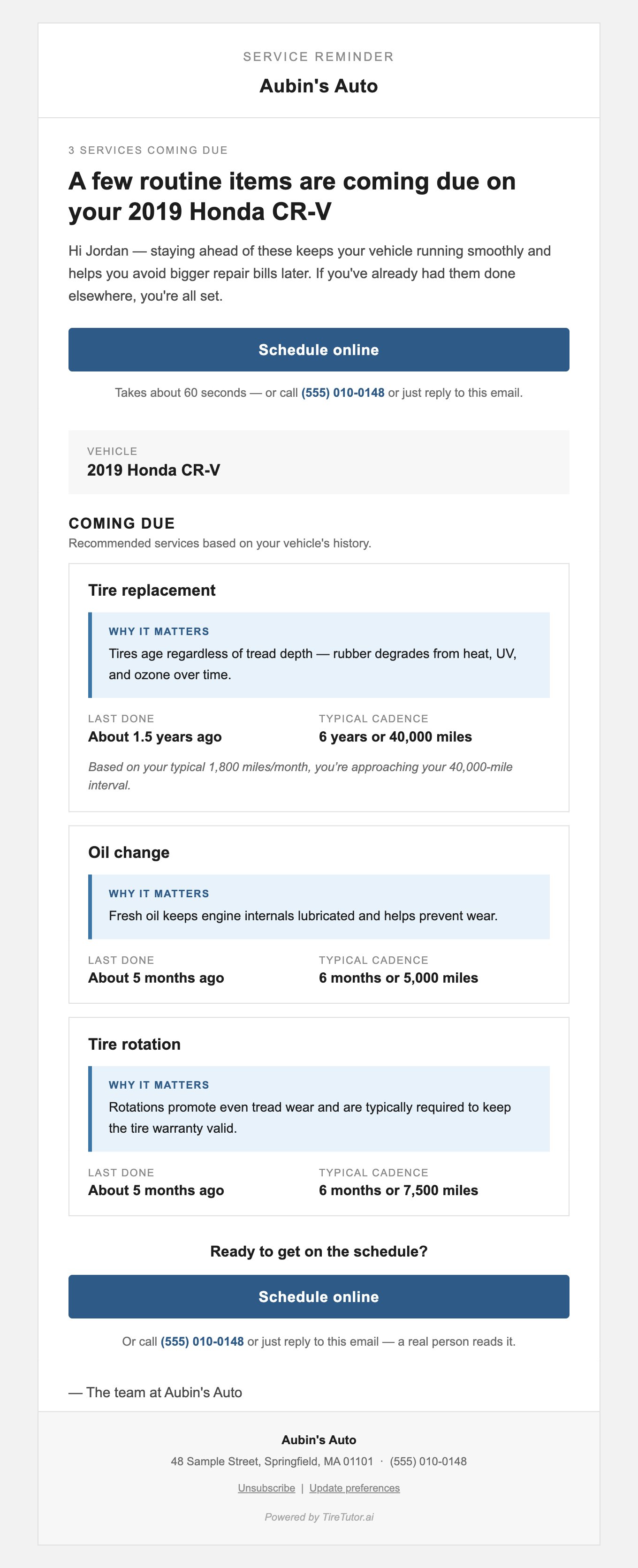
A plain, friendly email. No images, no coupons, no fine print. Here’s a real reminder for a customer with three services due at Ellijay Tire:
Rendered email for a customer with three services due — tire replacement, oil change, and tire rotation — sent from Ellijay Tire. The header shows a "SERVICE REMINDER" eyebrow above the shop name, followed by a context line, a vehicle-specific headline, an intro paragraph, a hero "Schedule online" button with a tap-to-call phone link in the subtext, a "VEHICLE" sticker, a "COMING DUE" section, and one card per service with a "Why it matters" rationale, the customer's last-service age, and the typical cadence. A second "Schedule online" button repeats below the service list. The footer carries the shop's name, address, phone, an unsubscribe link, and a small "Powered by TireTutor.ai" attribution.

Rendered SMS Remarketing email — sender, subject, and body all carry the shop's identity.

The customer can reply directly. Replies land in your shop’s inbox. The Schedule button opens your tiretutor.com page where they can book.

Why it looks the way it does

Three deliberate absences shape the email’s effect: No urgency countdowns. The email doesn’t say “due in 6 days.” It says “about 5 months ago.” The framing is educational — “here’s the typical interval, here’s where you are in it” — instead of pressuring. Customers respond to honest information. They unsubscribe from countdowns. No promotions or coupons. The email is an operational reminder, not a sales pitch. The moment you add a coupon, the email shifts from “your shop helping you remember” to “your shop selling you something.” That changes both the open rate and the trust relationship over time. No TireTutor branding in the body. The customer sees your shop name in the sender field, a tap-to-dial phone link in the body, your shop name in the sign-off, and your shop name and street address in the footer. The only TireTutor presence in the recipient’s view is the technical sender address on the tiretutor.com domain and a small “Powered by TireTutor.ai” attribution in the footer. The relationship is between your shop and your customer; TireTutor is plumbing.

How the cadence engine decides timing

Every service type has a typical interval — oil change every 6 months or 5,000 miles, tire rotation every 6 months or 7,500 miles, tire replacement every 6 years or 40,000 miles. (Full cadence table on the reference page.) The cadence engine tracks each customer’s last visit for each service type. When a customer approaches the typical interval, they enter the eligibility window for that service. The system sends the reminder during the window — not immediately, and not too late. For oil changes and tire rotations, the first reminder typically goes out about 5 months after the last service — not earlier. That’s deliberate. Reminding a customer too early signals “we’re trying to sell you something.” Reminding them right around the expected service date signals “we’re paying attention to your car’s needs.” The rotation cadence has one quiet twist: installing new tires counts as a rotation event. New tires leave the shop already in their starting positions, so the rotation clock resets on the install date. The next rotation reminder fires about 5 months later — even if no service line that day was labeled “rotation.” A customer whose only tire-related history with you is a fresh install still enters the rotation cadence at the install date.

When a high-mileage driver might get a reminder earlier than expected

Most reminders fire purely on calendar timing. The one exception is tire replacement, where the cadence (“every 6 years or 40,000 miles”) includes a real mileage projection. A customer who drives heavily — say, around 1,800 miles a month — hits 40,000 miles in under two years, well before the 6-year calendar mark; their replacement reminder lands at that point. When the mileage interval drives the reminder instead of the calendar, the email surfaces the reason in a small italic line under the service card:
Based on your typical 1,800 miles/month, you’re approaching your 40,000-mile interval.
When the calendar gate is the trigger — which is the typical case — that line is suppressed. The email explains itself only when the customer might mistake a correct reminder for a system error. Oil change and tire rotation use a calendar-only cadence today. The “or 5,000 miles” / “or 7,500 miles” half of each typical cadence is shown in the email as customer education (it matches the industry rule of thumb), but the reminder timing for those two services is purely calendar-based.

Why per-shop unsubscribe

A customer who visits multiple TireTutor shops has a separate relationship with each one. When they opt out at your shop, they’re saying “stop sending me reminders from this shop” — not “stop sending me anything from anyone.” So the program treats opt-outs per-shop by default. A customer marked as “no review requests” in your POS stops getting reminders from your shop. They keep getting reminders from other shops they visit. There’s also a global opt-out path — the unsubscribe link in the email footer — that stops reminders from every TireTutor shop the customer has visited. That covers customers who want out entirely.

Why a single email per customer per month

Each customer gets at most one reminder every 30 days, regardless of how many services are due. This cap is intentional. The program’s goal isn’t maximum email volume — it’s high-trust, durable retention. Customers stay subscribed when reminders feel rare and useful. They unsubscribe when reminders feel constant. Capping at one per 30 days keeps the channel sustainable for your shop and your customer over years, not just months.

Why nothing happens for 7 days after a visit

If a customer just walked out of your shop, they don’t need a reminder. The eligibility rules skip anyone whose last visit was within 7 days — even if other services are technically due. Sending right after a visit reads as careless. Waiting a week reads as attentive.

Where to go next

Reference

Look up eligibility rules, service cadences, and timing facts.

Manage opt-outs

Handle customer requests to stop receiving emails.